The Missing Interface Between You and Your AI Agent
How an Obsidian vault became the shared workspace where my AI and I actually collaborate.
01
The Problem
Every AI interface gets the relationship wrong.
You open a terminal. You type a command. The agent responds. You type another command. It responds again. This is the loop, whether you’re using Claude Code, ChatGPT, a Telegram bot, or a desktop app. You are the commander. The AI is the executor. And nothing moves unless you explicitly say so.
I’ve been building a B2B SaaS product with Claude as my primary engineering partner for over a year. The workflow: Claude Code in VS Code, an Obsidian vault as a structured knowledge base, a set of orchestration files that give the AI persistent state across sessions. It worked. But something still felt off.
The problem wasn’t intelligence. Claude is brilliant for about 45 minutes. Then context compaction fires (the model summarizes older conversation to free up token space) and the nuance evaporates. The company name survives. The architecture decisions don’t. You end up re-explaining your own product to an AI that confidently acts like it remembers, but doesn’t. Anthropic’s engineering blog calls context “a finite resource” and recommends structured note-taking as the mitigation. But structured notes only help if the agent can actually access them persistently, not just within a single session window.
The real bottleneck was the interface.
02
Your Tools Don’t Share a Workspace
Here’s what working with AI agents typically looks like. Claude Code can read your files, but its memory between sessions is a single CLAUDE.mdfile (Anthropic recommends keeping it under 200 lines). Claude Desktop has no filesystem access. The chat interface is stateless by design. Anthropic’s memory tool (released in beta, 2025) improves recall by about 39%, but it’s a key-value store, not a navigable knowledge base. You can’t browse it. You can’t organize it. You can’t see what the AI “knows.”
So you become the middleware. You copy context from your notes into the chat. You manually update status files. You re-explain decisions you made three sessions ago. You are the bridge between your knowledge and your tools, and that bridge is slow, lossy, and exhausting.
Every other collaboration tool solved this decades ago. Google Docs gave two people the same document. GitHub gave two developers the same codebase. Figma gave two designers the same canvas. But AI agents? They get a chat window. A terminal. A message thread. None of these give you a shared workspace where both parties can read, write, and respond to each other’s work.
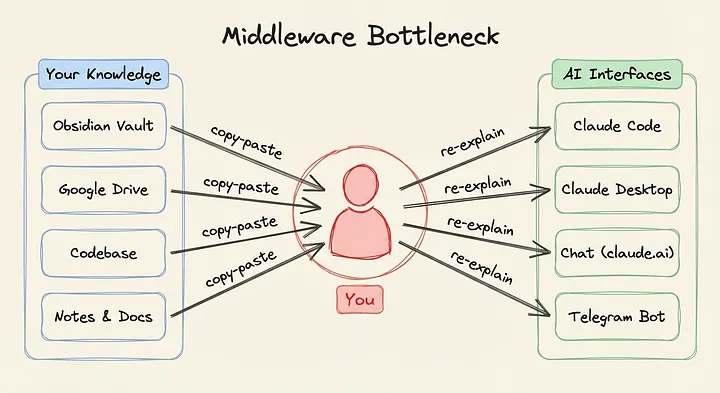
Every arrow passes through you.
03
Why Obsidian Is the Natural Communication Layer
Markdown is the one format both humans and LLMs read and write natively.
It’s lightweight, plain-text, and carries structure without ceremony: headers, lists, links, frontmatter. No proprietary format. No database lock-in. No quarterly-report-v3-FINAL(2).docx slowly rotting in a shared drive.
Obsidian takes a folder of .md files and treats it as a first-class knowledge base. Folder structure provides semantic context: a file in product/sprints/ means something different than one in company/legal/. Wikilinks ([[like this]]) create a navigable graph between documents. Full-text search works across everything. And critically, the vault is the filesystem. There’s nothing to export, no API to call, no sync layer to configure. Files are files.
vault/
  _Claude/               ← Orchestration files (AI reads on startup)
  foundations/            ← Strategy & vision
  product/               ← SaaS platform
  engine/                ← Research & data pipelines
  company/               ← Operations
  journal/               ← Session logs & weekly reviews

  _OpenClaw/             ← AI agent workspace
    _agent/                 Identity, skills, workflows (all .md)
    work/                   Drafts, research, polished output
Every folder carries meaning. The agent knows that company/legal/ is read-only, that journal/sessions/ contains handoff notes from prior conversations, and that _Claude/status.md is the first thing to check on startup.
The missing piece was Obsidian Headless, Obsidian’s official headless sync client (currently in open beta) that syncs a vault to a server, bidirectionally, without the desktop app. It installs via npm install -g obsidian-headless, requires an Obsidian Sync subscription ($4/month), and runs as a systemd service. When I edit a note on my MacBook or iPhone, the change appears on the server within seconds. When my AI agent creates a file on the server, it appears in my Obsidian app on every device.
That’s the interface. Not a chat window. Not a command line. A shared folder that both of us can see and edit, in real time, with the full context of the project’s structure around every file.
04
What Working With an Agent Actually Looks Like
The real work happens in the vault.
I run OpenClaw, a persistent AI agent framework, on an AWS Lightsail instance tunneled through Cloudflare for zero-trust access. The agent’s entire workspace lives inside my Obsidian vault at _OpenClaw/_agent/. Its identity, skills, and workflows are all markdown files I can open and edit in Obsidian.
_OpenClaw/_agent/
  SOUL.md                ← Identity & vault navigation map
  skills/                ← Editable workflow definitions (.md)
  workflows/             ← Multi-step pipelines

_OpenClaw/work/
  drafts/                ← In-progress work
  research/              ← Research briefs
  output/                ← Polished deliverables
The agent has a file called SOUL.md that defines who it is, what it helps with, and how it navigates the vault. It contains a table mapping every folder to its contents and purpose: foundations/ for strategic docs, product/ for engineering specs, company/ for market research. When I restructure the vault, I update the table. Next session, the agent navigates the new structure. No redeployment. No code change. I edited a markdown file.
Skills work the same way. The article pipeline that produced the draft you’re reading is a .md file in the vault. It defines six phases (research, outline, draft, visuals, edit, assembly) with specific instructions for each. I tuned the research phase last week by editing the skill file in Obsidian on my phone. The agent picked up the change on its next run.
The conversational layer is Telegram. I can send a voice message or text, and the agent processes it through the gateway. But Telegram isn’t the interface. It’s the trigger. The real work happens in the vault. I say “research competitor X,” the agent runs a deep research pipeline, and the output (a structured markdown brief with sources, data points, and analysis) appears in OpenClaw/work/research/ in my Obsidian app. I read it on my iPad. I add a comment via a callout block. The agent sees the addition next session.
Ten plugins handle capabilities: web research (Tavily, Exa), browser automation (Firecrawl), text-to-speech (ElevenLabs), image generation, and an Obsidian skills bundle for vault operations. Two MCP servers provide parallel search and task execution for deep research. LanceDB provides semantic memory with Cohere embeddings for when the agent needs to recall something across hundreds of files. But the glue, the thing that makes all of it collaborative instead of just capable, is the shared vault.
05
Autonomous but in the Loop
The hardest part of working with AI agents isn’t capability. It’s staying informed without micromanaging.
Chat interfaces force you to either watch the agent work in real time or come back later and ask “what did you do?” Both are bad. One wastes your time. The other requires trust you haven’t earned.
The vault solves this because visibility is passive. I don’t ask what changed. I open Obsidian and see new files in the output folder. I don’t re-explain context. The agent reads the vault. I don’t check if it understood my last update. The file is right there, and we’re both looking at it.
Before: Start a Claude Code session, wait for it to read the status files, re-explain whatever it got wrong, work for an hour, run /session-logto capture the handoff, close the session, repeat tomorrow. Every session started with a tax of 5–15 minutes of context reconstruction.
Now: I update status.md in Obsidian during a meeting. The agent reads it when I trigger a task later. It already knows what changed. I review its output by scrolling through my vault, the same way I review my own notes. The loop is closed, and neither of us is waiting on the other.
This is the balance I spent a year searching for. Not full autonomy: I don’t want an agent making decisions I can’t see. Not full control: I don’t want to be the bottleneck on every action. Something in between. An agent that works independently but leaves a visible trail in a workspace we both share. Autonomy with transparency. And the interface that makes it possible isn’t an app. It’s a folder of markdown files.
06
Start With a Shared Folder
You don’t need Lightsail, Cloudflare, or OpenClaw to start. The pattern works at any scale.
Create a status.mdfile that your AI reads on session startup. Write what you’re working on, what’s blocked, what’s next. That single file eliminates the “let me catch you up” tax from every session. Add tasks.md for a shared to-do list. Add decisions.md so past reasoning survives compaction. Three files, and your AI stops being a stranger every morning.
When you’re ready for bidirectional sync, add Obsidian Headless to a server and point it at your vault. Now the agent can write back (research outputs, drafted documents, status updates) and you see them instantly. The vault becomes the workspace, not just the reference library.
The AI agent landscape is moving fast. Models get smarter every quarter. Context windows expand. Memory features improve. But the interface problem — how you actually work with an AI and not just talk toone — is still wide open. A shared folder of markdown files isn’t the sexiest answer. But it’s the one that works.